+33 (0)4 72 14 17 99
0 Quote
Contact us

Introduction

The choice of an industrial display should not be limited to the size of the screen, the resolution or the price.

In a demanding professional environment, the real selection criteria often lie elsewhere: where will the display be installed, under what conditions will it operate, and what stresses will it have to withstand on a daily basis?

A display that is perfectly suited to an office environment can quickly reach its limits on a production line, in a dusty area, outdoors, in a damp environment or in an application running 24 hours a day.

To ensure good readability, seamless integration and long-term reliability, it is important to choose a display solution designed to withstand the demands of the working environment.

Why choose an industrial display rather than a standard one?

An industrial display is designed to withstand conditions that standard displays are not generally built to cope with:

  • Continuous operation;
  • Exposure to dust or moisture;
  • Mechanical vibrations;
  • Frequent cleaning;
  • Variable temperatures;
  • Intensive touchscreen use;
  • Integration into a machine, a control cabinet or an operator console.

In industry, a display is not merely a display device. It often becomes a central component of the human-machine interface, supervision, production control or the visualisation of field data.

This is why the choice must be guided by the operating environment rather than by technical specifications alone.

Start with the environment, not the screen size

When a project gets underway, the first questions often concern visible aspects:

  • What screen size should we choose?
  • Do we need a touchscreen or not?
  • Is Full HD resolution sufficient?
  • Should the screen be recessed or mounted on an arm?

These questions are important, but they shouldn’t be the first ones asked.

The right starting point is rather:

In what environment will the industrial display be used?

A 15-inch, 21.5-inch or 23.8-inch display may require a very different design depending on where it is installed:

  • On a production line;
  • In an industrial cabinet;
  • In a food processing area;
  • On an outdoor kiosk;
  • In a control room;
  • On medical equipment;
  • In an OEM machine;
  • In a vehicle or an in-vehicle application.

The environment will determine the level of protection, brightness, touch technology, mounting type, video interfaces, mechanical robustness and expected maintenance requirements.

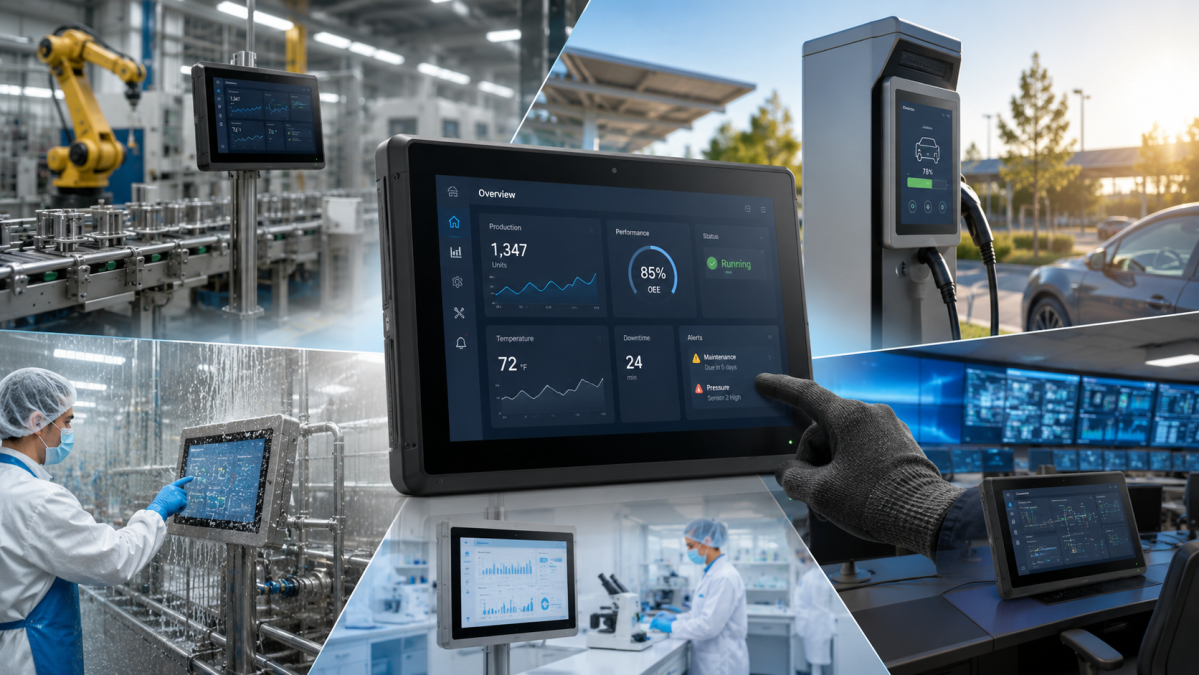
Industrial display for production lines and workshops

Industrial workshops and production lines are among the most common environments for industrial displays.

They are used to display HMI interfaces, production dashboards, MES data, operator instructions or information from supervisory systems.

Main constraints

On a production line, a display may be exposed to:

  • Dust;
  • Light splashes;
  • Vibrations;
  • Temperature fluctuations;
  • Repeated handling;
  • Prolonged use across multiple shifts;
  • Environments that are sometimes laden with particles or industrial residues.

In this context, the aim is not merely to achieve high image quality. The key challenge is to have a stable, legible and durable display, capable of operating without unnecessary downtime.

Key features to prioritise

For workshop or production applications, it is advisable to prioritise:

  • A robust chassis;
  • A display panel suitable for industrial use;
  • A design intended for continuous use;
  • A capacitive or resistive touchscreen, depending on the conditions of use;
  • Front protection against dust and splashes;
  • Video interfaces suited to the existing installation;
  • VESA, panel mount or wall-mounted installation, depending on the operator station.

Typical applications

Industrial displays are particularly well suited to:

  • HMI workstations;
  • Special-purpose machinery;
  • Assembly lines;
  • Quality control stations;
  • Production dashboards;
  • MES or SCADA interfaces;
  • Shop floor operator stations.

In this type of environment, ruggedness often takes precedence over advanced display performance. A well-integrated, legible and robust display can prevent downtime, premature replacements and a loss of operator comfort.

Industrial display for outdoor use

Outdoor applications impose much more severe constraints than indoor environments.

A screen installed outdoors must remain legible despite natural light, withstand temperature fluctuations, resist humidity and maintain a good level of performance despite prolonged exposure.

Main constraints

Outdoor installations may expose the screen to:

  • Direct sunlight;
  • Glare;
  • Rain;
  • Humidity;
  • Temperature fluctuations;
  • UV radiation;
  • Variations in brightness between day and night.

In this context, standard brightness levels can quickly become insufficient. A screen that is difficult to read forces the user to move closer, change their viewing angle or repeat certain actions, which detracts from the user experience.

Key features to prioritise

For outdoor or semi-outdoor applications, the following factors generally need to be considered:

  • A high-brightness panel;
  • An anti-glare coating;
  • Good readability in bright environments;
  • A design adapted to temperature fluctuations;
  • Protection against water and dust;
  • A robust mounting system;
  • Connectivity compatible with integration into a terminal or piece of equipment.

Brightness is important, but it is not the only factor. Surface treatment, contrast, viewing angle and mechanical integration also play a major role in actual readability.

Typical applications

High-brightness industrial displays can be used for:

  • Charging points;
  • Interactive kiosks;
  • Intelligent transport systems;
  • Car park equipment;
  • Outdoor terminals;
  • Industrial signage applications;
  • Operator workstations in brightly lit areas.

For this type of project, it is important to assess the actual installation environment: direct or indirect exposure to sunlight, duration of use, screen orientation, type of housing, weather conditions and viewing distance.
Industrial display for the food and drink industry and washdown environments

Food and drink environments impose specific requirements. The screen may be exposed to moisture, splashes, cleaning cycles and, at times, detergents.

In this context, robustness is not merely a matter of withstanding dust or impacts. The challenge lies in maintaining stable operation following frequent cleaning and repeated exposure to damp conditions.

Key challenges

In the food and drink industry, an industrial display may be subjected to:

  • Water splashes;
  • Regular cleaning;
  • Damp environments;
  • Hygiene requirements;
  • Food residues;
  • Temperature fluctuations;
  • Surfaces that must remain easy to clean.

Key features to prioritise

For this type of application, the following should be prioritised:

  • A waterproof housing;
  • An easy-to-clean surface;
  • A chassis suitable for damp environments;
  • An IP rating consistent with cleaning procedures;
  • A design that minimises areas where dirt can accumulate;
  • A touchscreen that can be used under the actual working conditions of the workstation.

Depending on requirements, Panel PCs or industrial stainless steel screens may also be considered, particularly where the environment imposes stricter requirements regarding hygiene, cleaning or corrosion resistance.

Typical applications

Industrial screens can be used in:

  • Packaging lines;
  • Food and drink production machinery;
  • Weighing equipment;
  • Operator interfaces in wet areas;
  • Beverage production lines;
  • Control stations in food production.

In these environments, the choice of display must be made in line with the cleaning procedures actually carried out on site. The frequency, pressure, cleaning agents used and exposure of the front panel are key factors.

Industrial display for laboratories, healthcare and clean environments

Medical, pharmaceutical and laboratory environments may seem less harsh than an industrial workshop, but their requirements are often very high.

Cleanliness, ease of disinfection, continuity of service and display quality are important criteria.

Key constraints

These applications may require:

  • Surfaces that are easy to clean;
  • Good display stability;
  • Continuous operation;
  • Compact integration;
  • Reduced maintenance;
  • A precise touch interface;
  • Compatibility with specific equipment.

Key features to prioritise

For medical or laboratory environments, the following should be considered:

A fanless design where appropriate;

  • Smooth surfaces;
  • Good image quality;
  • Reliable touch functionality;
  • Clean mechanical integration;
  • Limited maintenance;
  • Connectivity suited to the equipment in use.

Typical applications

Industrial displays can be used for:

  • Clinical workstations;
  • Medical trolleys;
  • Laboratory equipment;
  • Diagnostic systems;
  • Pharmaceutical machine interfaces;
  • Monitoring and supervision workstations.

Even where the environment appears to pose few constraints, uninterrupted operation remains essential. A display installed on critical equipment must be selected for its long-term reliability.

Industrial display for control rooms and centralised monitoring

Control rooms present different challenges to workshops or outdoor environments.

Here, the main problem is not always dust, water or impacts. The key issues are rather the organisation of the display, long-term readability, the management of multiple screens, and the distance between operator workstations and IT equipment.

Key constraints

A control room may involve:

  • Multiple screens used simultaneously;
  • Continuous monitoring systems;
  • A high density of displayed information;
  • Significant distances between PCs and screens;
  • The need for centralised maintenance;
  • Operator workstations that must remain quiet and ergonomic.

Key features to prioritise

For a control room, it is recommended to consider:

  • Large-size screens;
  • A resolution suited to the software used;
  • Reliable video connectivity;
  • Multi-screen compatibility;
  • Good readability over long periods;
  • Flexible mounting;
  • Video and USB extension solutions when the PC needs to be installed remotely.

In many industrial projects, the display and the industrial PC are not installed in the same location. The PC may be housed in a cabinet or a plant room, whilst the display remains at the operator’s workstation. This approach helps to minimise heat, noise and the need for maintenance directly at the workstation.

Typical applications

Industrial displays can be used in:

  • Process control rooms;
  • Supervision centres;
  • SCADA stations;
  • Transport monitoring centres;
  • Industrial utilities;
  • Security control rooms;
  • Energy facilities.

For this type of application, ergonomics and the organisation of information flows are just as important as the display’s technical specifications.

Industrial display for terminals, kiosks and OEM integration

In interactive kiosks, specialised machines and OEM projects, the screen must be integrated into an existing or bespoke mechanical assembly.

The choice therefore concerns not only the panel or touchscreen technology, but also the integration format.

Key constraints

System integrators and machine manufacturers often have to deal with:

  • Space constraints;
  • Precise mechanical cut-outs;
  • Limited access for maintenance;
  • Integration into an existing chassis;
  • Customisation requirements;
  • Aesthetics consistent with the final equipment;
  • Mass or semi-mass production.

Key features to prioritise

For OEM integration, the following must be analysed:

  • The open-frame format;
  • Panel-mount installation;
  • VESA compatibility;
  • Mechanical dimensions;
  • Available connectivity;
  • Touch technology (resistive or capacitive);
  • Brightness;
  • Product availability period;
  • Customisation options.

Typical applications

Industrial displays can be integrated into:

  • Kiosks;
  • Service terminals;
  • Special-purpose machines;
  • Payment terminals;
  • Reception kiosks;
  • On-board control systems;
  • OEM interfaces.

In these projects, it is advisable to incorporate the choice of display at a very early stage of the design process. An incorrect choice of format can lead to costly mechanical modifications or integration constraints that are difficult to rectify later on.

Choosing the right type of mounting

The type of mounting is a key factor in choosing an industrial display. It affects mechanical integration, operator ergonomics, maintenance accessibility and compatibility with the end equipment.

VESA mounting

VESA mounting is suitable for operator workstations, articulated arms, wall brackets or flexible installations. It is particularly useful when the display needs to be rotated, repositioned or installed on an existing workstation.

Panel mounting

Panel mounting is often used in industrial cabinets, control consoles and machine interfaces. It allows for a clean integration into the front panel, with direct access to the operator interface.

Open-frame

The open-frame format is designed for OEM integrations, terminal units, kiosks or specialised machinery. It offers greater mechanical flexibility but requires a more detailed assessment of the integration.

Arm-mounted

Arm-mounted installation is suitable for operator workstations requiring mobility, ergonomics and easy access to the screen. It is common in industrial, medical or logistics environments. The choice of mounting method must always be defined at the outset of the project. It determines the mechanical design, connectivity, ease of use and maintenance.

Choosing the right touchscreen technology

Touch technology should be chosen based on the conditions of use, and not solely on the basis of habits or market trends.

Projected capacitive touch (PCAP)

Projected capacitive touch is now very widespread. It offers good accuracy, a smooth user experience and, depending on the model, may support multi-touch. It is suitable for operator workstations, HMI interfaces, kiosks and applications requiring frequent and intuitive interaction.

Resistive touch

Resistive touch remains relevant in certain industrial applications, particularly where use with gloves, a stylus or under specific conditions is common. It can be adapted to more traditional environments or existing systems.

Infrared and other touch technologies

Certain specific touch technologies can be used for large formats or specialised applications. The choice then depends on the screen size, the environment, the type of interaction and integration constraints. There is no single touch technology that is universally superior. Above all, there is a technology suited to the actual use case.

What brightness should you choose for an industrial display?

Brightness is an important factor, but it must be assessed in the context of the environment. For a typical indoor environment, standard brightness may be sufficient. For a very bright area, an outdoor terminal or a workstation exposed to natural light, higher brightness becomes necessary.

High-brightness screens are particularly useful when the screen needs to remain legible in bright or semi-outdoor environments.

However, brightness alone does not guarantee legibility. The following factors must also be taken into account:

  • Anti-glare coating;
  • Contrast;
  • Viewing angle;
  • Screen orientation;
  • The presence of a protective glass panel;
  • Direct or indirect exposure to sunlight.

A high-brightness screen that is poorly integrated may still be difficult to read. Conversely, a screen that is correctly treated and well-oriented can offer excellent user comfort.

Industrial display or Panel PC: what’s the difference?

An industrial display is a monitor designed for display and touch interaction. It must be connected to an industrial PC, a PLC, an embedded system or an external video source.

An industrial Panel PC integrates the touchscreen and the computer into a single unit. The choice therefore depends on the nature of the project.

Choose an industrial display when...

  • The PC needs to be installed remotely;
  • You wish to centralise IT maintenance;
  • Space at the operator’s workstation is limited;
  • Several screens need to be connected to the same system;
  • The integration requires a separation between the display and the processing unit.

Choose a Panel PC when...

  • The application requires an all-in-one solution;
  • Space for integration is limited;
  • The operator’s workstation must integrate the screen and the processing unit directly;
  • You wish to simplify local cabling;
  • The HMI application runs directly on the unit.

In some projects, separating the display from the industrial PC is more appropriate. In others, the Panel PC offers simpler integration. The right choice depends on the expected level of maintenance, the environment, the distance from the control cabinet and the overall architecture.

Quick-reference matrix

Environment Specific constraints Key features to look out for
Workshop / production line Dust, vibrations, continuous use Robust chassis, suitable touchscreen, industrial-grade assembly
Outdoors / well-lit area Sunlight, reflections, humidity, temperature fluctuations High brightness, anti-glare, reinforced protection
Agri-food Cleaning, humidity, hygiene Waterproof front panel, wipe-clean surface, stainless steel where required
Laboratory / health Disinfection, cleanliness, continuity of service Smooth surfaces, fanless, reliable touchscreen
Control room Multi-screen display, continuous monitoring, distance between PC and screen Large formats, reliable connectivity, video/USB extension cable
Kiosk / Stand / OEM Mechanical integration, series production, customisation Open frame, panel mount, customised dimensions
Special-purpose machine Space requirements, maintenance, operator interaction Suitable mounting, industrial-grade touchscreen, compatible connectors

Questions to ask yourself before choosing an industrial display

Before choosing a model, it is worth answering a few simple questions:

  • Will the screen be installed indoors or outdoors?
  • Will it be exposed to dust, water or splashes?
  • Will it need to operate 24 hours a day?
  • Will it be used whilst wearing gloves?
  • What viewing distance is expected?
  • Will the screen be recessed, mounted on an arm or fitted using a VESA mount?
  • What video connections are required?
  • Will the PC be located close to the screen or installed remotely?
  • Is the ambient light level high?
  • Are there any cleaning requirements to consider?
  • Does the product need to be available over the long term?
  • Is any mechanical or technical customisation required?

These questions help to avoid making a hasty decision based solely on screen size.

Conclusion: there is no such thing as a universal industrial display

The right industrial display is not necessarily the largest, brightest or most expensive one. It is the one that is truly suited to the environment in which it will operate. A display intended for a production line does not have the same priorities as one installed on an outdoor kiosk, in a control room, in a food processing area or in OEM equipment.

To make the right choice, several criteria must be considered:

  • The installation environment;
  • The required brightness;
  • The touch technology;
  • The protection rating;
  • The mounting format;
  • The connectivity options;
  • Maintenance;
  • The expected service life;
  • Integration constraints.

Our approach

We support manufacturers, system integrators and machine builders in selecting industrial displays suited to their on-site requirements.

Our range covers various types of industrial displays – including open-frame, high-brightness and arm-mounted models – with a range of touchscreen, connectivity and mounting options to meet the needs of industrial, embedded, medical, logistics and monitoring applications.

Need help choosing your industrial display?

Do you have a project involving integration, supervision, a terminal, a specialised machine or an operator workstation?

Our teams will help you choose the solution best suited to your environment, your installation constraints and your operational requirements.

Contact us now for advice on choosing your industrial display.

FAQ – Choosing an industrial display

Which industrial display should you choose for a production line?

For a production line, priority should be given to a robust screen, designed for continuous operation, with touch technology suited to the operators and a mounting system compatible with the machine station.

What brightness is required for an outdoor industrial display?

For outdoor use or in very bright environments, a high-brightness display is recommended. Readability also depends on the anti-glare coating, contrast, orientation and mechanical integration.

What is the difference between an industrial display and a Panel PC?

An industrial display is a monitor connected to a PC or an external video source. A Panel PC combines the touchscreen and the computer into a single unit.

What type of touchscreen should you choose for an industrial display?

Capacitive touchscreens are well suited to modern interfaces and frequent use. Resistive touchscreens remain suitable for certain industrial environments, particularly where gloves are worn or specific constraints apply.

Why use an industrial display rather than a standard one?

An industrial display is designed to withstand the rigours of the field: 24/7 operation, dust, humidity, vibrations, machine integration, industrial installation and long-term maintenance.