+33 (0)4 72 14 17 99
0 Quote
Contact us

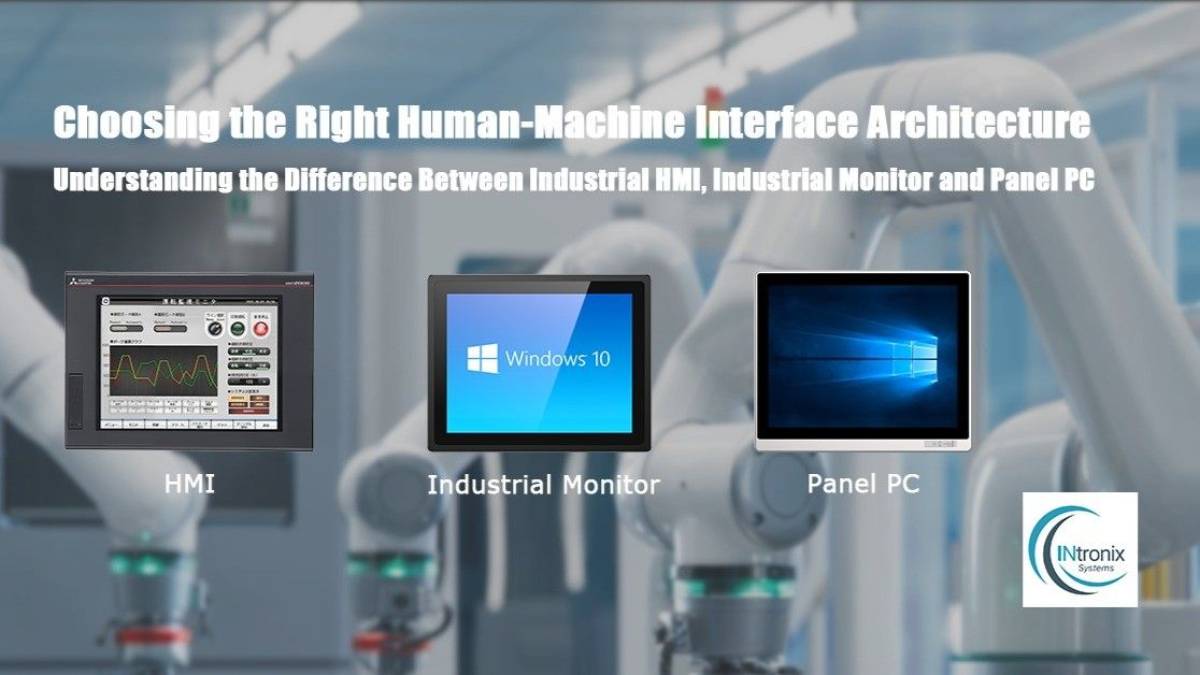
On a production floor, many operator interfaces may look similar at first sight: a touchscreen mounted on a machine, control console, supervision workstation or production terminal.

However, the system behind that screen can be fundamentally different.

Three architectures are particularly common:

  • PLC + HMI;

  • industrial monitor + industrial PC;

  • industrial Panel PC.

The key difference is not simply the display itself. It is where the computing takes place, what role the operator interface performs and how the system communicates with the machine.

Understanding this distinction helps select an architecture that matches control, supervision, maintenance and future system requirements.

Architecture 1: PLC + HMI

In a traditional automation architecture, the PLC performs the control logic while the HMI allows the operator to interact with the machine.

The HMI may be used to:

  • start or stop equipment;

  • change operating parameters;

  • select recipes;

  • display alarms;

  • monitor process status.

The automation logic remains mainly within the PLC.

The HMI primarily acts as the operator interface.

When is this architecture relevant?

A PLC + HMI architecture is particularly appropriate when the main purpose is to control an automated machine or process through a dedicated interface.

Typical applications can include:

  • packaging machines;

  • CNC equipment;

  • injection moulding machines;

  • processing equipment;

  • assembly machines.

For a relatively self-contained application where the main functions are managed directly by the PLC, this architecture provides a clear distinction between machine control and operator interaction.

Architecture 2: industrial monitor + industrial PC

In this configuration, the industrial monitor provides the display and, when fitted with a touchscreen, the operator interaction layer.

Computing is performed by a separate industrial PC, installed locally or remotely.

The architecture therefore separates two functions:

  • Industrial monitor = display and interaction
  • Industrial PC = computing

This separation can provide significant flexibility when designing an operator workstation.

For example, the industrial PC can be installed inside a cabinet or protected area while only the monitor remains exposed to the operator environment.

Why separate the display and the computer?

This architecture becomes particularly relevant when an application requires:

  • higher computing capability;

  • independent maintenance of the display and PC;

  • separate hardware upgrade cycles;

  • a specific location for the computer;

  • several displays connected to one computing platform;

  • centralised IT infrastructure.

It can be particularly suitable for supervision applications, SCADA systems, control workstations, machine vision and production dashboards.

Explore the INTRONIX Systems industrial monitor range for operator stations where the display and computing platform need to remain separate.

Architecture 3: industrial Panel PC

A Panel PC integrates the touchscreen display and the computer into a single device.

Unlike a standalone industrial monitor, it includes its own computing platform and can run an operating system and business applications directly.

Depending on the model and application, Panel PCs can support Windows, Linux or Android.

A Panel PC therefore combines: display + touch interface + computing in one device.

Why integrate both functions?

This approach reduces the number of individual devices required around the operator station.

It can be appropriate when:

  • installation space is limited;

  • the workstation must remain compact;

  • computing needs to be located directly at the operator position;

  • cabling must be reduced;

  • the application requires a complete computer;

  • mechanical integration needs to remain straightforward.

INTRONIX Systems industrial Panel PCs can therefore be used for advanced machine interfaces, MES terminals, SCADA applications, supervision workstations and embedded applications.

The key difference: where does the computing take place?

The fastest way to understand these three architectures is to identify which device actually performs the computing.

Architecture Screen function Main computing location
PLC + HMI Operator interface PLC
Industrial monitor + PC Display and interaction External industrial PC
Panel PC Display, interaction and computing Inside the Panel PC


This distinction should guide the initial design decision.

Two touchscreens of the same size can therefore perform completely different roles within an industrial system.

HMI: when machine control remains at the centre

In a PLC + HMI architecture, system logic remains directly linked to machine automation.

The operator interacts with variables, commands and parameters controlled by the PLC.

This organisation makes sense when the operator terminal is primarily used for machine control.

The most important considerations are therefore not necessarily computing power, but communication with the PLC, interface ergonomics and the information that must be presented to the operator.

To explore this choice in more detail, read our guide HMI vs Panel PC: which solution should you choose for industrial automation?

Industrial monitor + PC: when modularity matters

Separating the display from the computer gives greater freedom when organising the system.

The computing platform can be replaced or upgraded without necessarily changing the screen.

Conversely, the monitor can be replaced while retaining the existing industrial PC.

This independence can simplify:

  • maintenance;

  • hardware upgrades;

  • lifecycle management;

  • installation of the computer in a protected location;

  • multi-display configurations.

It does, however, require additional cabling and more careful system integration.

For a more detailed comparison, see our guide Panel PC vs Industrial Monitor + IPC: how to choose an industrial workstation architecture.

Panel PC: when compact integration is the priority

A Panel PC takes the opposite approach by combining the main functions inside one enclosure.

The display, touchscreen, operating system, network interfaces and computing platform can all be integrated into a single device.

This can be particularly useful where installation depth and space around the machine are limited.

However, the display and computing platform become part of a more integrated hardware system.

Which architecture for which application?

Direct control of an automated machine

When the main requirement is to modify PLC parameters and display machine status, a PLC + HMI architecture is a natural solution to consider.

Supervision and SCADA

Supervision applications may require additional functions such as historical data, trends, network communication or additional software.

A Panel PC or industrial monitor + IPC architecture may therefore be more suitable depending on where the computing platform needs to be installed.

MES and production data collection

MES terminals generally need to run complete applications and communicate with other information systems.

A Panel PC can combine the display and computing platform.

An industrial monitor + PC architecture allows both elements to remain separate when modularity or maintenance is a priority.

Machine vision

Machine vision applications may require more computing power, camera interfaces or expansion capability.

In these cases, separating the monitor from a dedicated industrial PC can provide more flexibility when selecting the computing platform.

A Panel PC can still be suitable when its processing capability and connectivity match the application's requirements.

Dashboard or information terminal

When the display mainly presents information generated by another system, an industrial monitor may be sufficient.

Adding a complete computer directly behind the screen may not provide additional value.
Quick architecture selection table

Main requirement Architecture to consider
Control a PLC-based machine PLC + HMI
Display information from another computer Industrial monitor
Run Windows/Linux/Android locally Panel PC
Separate display from computing Industrial monitor + IPC
Reduce the number of devices Panel PC
Upgrade display and computing independently Industrial monitor + IPC
Use a specialised computing platform Industrial monitor + IPC
Build a compact touchscreen computer Panel PC


This table provides an initial direction. The final choice also depends on mechanical, electrical, environmental and software constraints.

Do not start with screen size

A common mistake is to decide that the application requires a 10", 15" or 21" touchscreen and then choose the architecture afterwards.

The process should be reversed.

Start by answering these questions:

1. What actually controls the machine? A PLC, industrial computer or another controller?

2. Where should the computing take place? Directly behind the display or elsewhere?

3. What software must run? A PLC visualisation environment, Windows application, SCADA, MES or dedicated software?

4. How much future evolution is expected? Will the application remain unchanged for several years or require regular upgrades?

5. How will maintenance be performed? Does the display need to be replaceable independently from the computer?

Once these questions have been answered, screen size, touch technology, brightness, ingress protection and connectivity can be selected much more accurately.

HMI, industrial monitor or Panel PC: choose the system before the screen

An operator interface should therefore not be selected solely according to its appearance or screen dimensions.

An HMI is primarily designed to let an operator interact with an automation system.

An industrial monitor provides the display and potentially touch interaction while relying on an external computing platform.

A Panel PC combines both display and computing in a single industrial device.

The right choice depends primarily on the role the operator station must perform within the overall system.

INTRONIX Systems offers industrial Panel PCs and industrial touchscreen monitors that can be integrated into these different architectures according to the project's computing, integration and operator requirements.