+33 (0)4 72 14 17 99
0 Quote
Contact us

Rugged PDA and rugged tablet: two mobile devices, two different approaches

In the field, warehouse, production environment or during maintenance operations, selecting a mobile device should not be based on technical specifications alone.

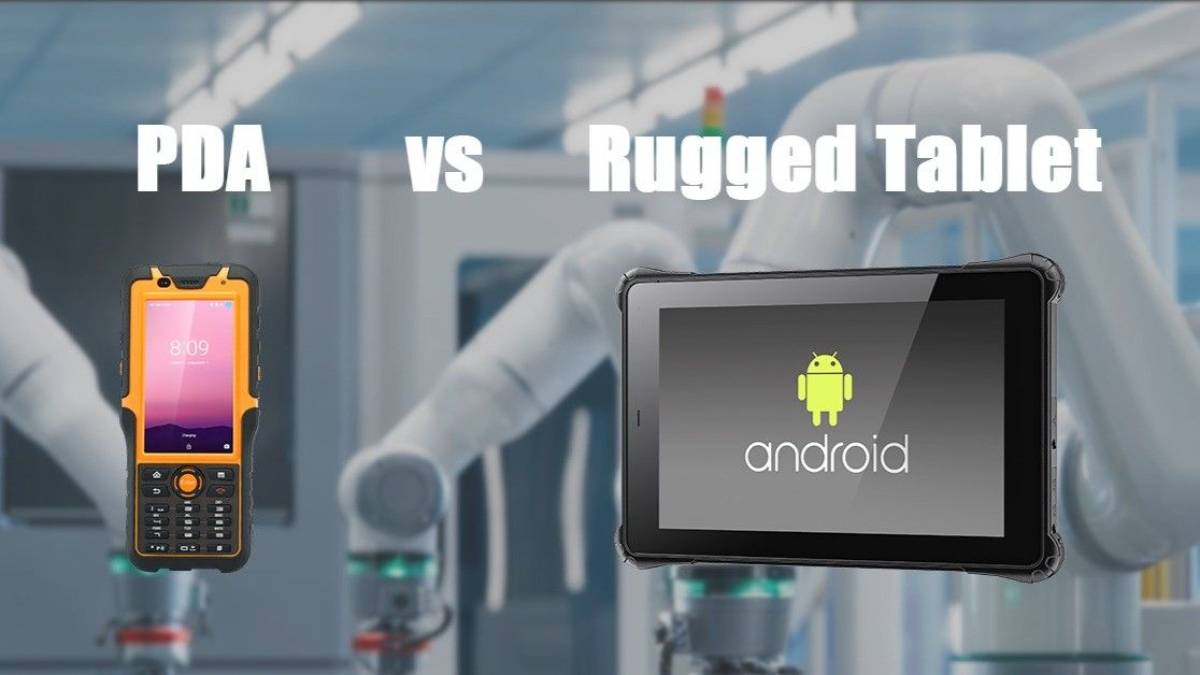
A rugged PDA and a rugged tablet can both provide Android, 4G connectivity, Wi-Fi, Bluetooth, GNSS and data capture functions. However, their ergonomics and typical use cases are significantly different.

A PDA generally prioritizes mobility, handheld operation and fast data capture. A tablet provides a larger display, more workspace for complex business applications and greater viewing comfort.

The right choice therefore starts with a simple question: what does the operator actually need to do with the device?

Rugged PDA vs rugged tablet: the main differences

Criterion Rugged PDA Rugged Tablet
Form factor Compact, typically 4.5" to 7" Typically 8" to 12"
Handling Suitable for frequent mobile use Larger working surface
Operating system Mainly Android Android or Windows
Barcode scanning Particularly suited to repetitive scanning Available depending on model
NFC / RFID Depending on model Depending on model
4G / 5G, Wi-Fi, Bluetooth, GNSS Depending on model Depending on model
Document viewing Suitable for short information More comfortable for documents, drawings and forms
Complex business applications Smaller display Larger workspace
Vehicle use Possible with suitable accessories Particularly relevant with an appropriate dock
Continuous mobility Key advantage Possible with a larger footprint


The question is therefore not which device is intrinsically better. The device should match the workflow, frequency of interaction and type of information handled by the operator.

When should you choose a rugged PDA?

A rugged PDA is particularly relevant when operators move frequently and perform a sequence of short actions: scan, identify, validate, enter information and immediately move to the next operation.

Its compact design makes it suitable for highly mobile applications and workflows involving frequent handling.

Logistics, picking and inventory

In a warehouse, an operator may interact with a mobile terminal hundreds of times during a working day.

A rugged PDA is particularly suitable for:

  • 1D/2D barcode scanning;

  • product and location identification;

  • order picking;

  • inventory operations;

  • receiving and shipping control;

  • updating information in a WMS or business application.

In these workflows, a compact form factor can provide a significant ergonomic advantage.

Transportation and field operations

Rugged PDAs can also support technicians, drivers and field operators who need to access assignments, enter information, identify equipment or transmit data while moving.

Depending on the model, features such as 4G LTE, Wi-Fi, Bluetooth and GNSS allow the terminal to be integrated into a wide range of mobile workflows.

Explore our rugged industrial PDA range for logistics, traceability, transportation and field mobility applications.

When should you choose a rugged tablet?

When operators need to view more information or interact with richer interfaces, a rugged tablet provides a clear advantage through its larger display.

8", 10.1", 11.6" and 12" formats provide more screen space for forms, dashboards, technical documents and business applications.

Maintenance and diagnostics

During a maintenance operation, users may need to access several types of information:

  • maintenance procedures;

  • technical documentation;

  • photographs;

  • maintenance forms;

  • equipment history;

  • CMMS applications;

  • diagnostic information.

A larger screen can make these tasks easier to perform.

Inspection and control

For completing detailed forms, documenting an intervention, reviewing photographs or consulting technical information, a rugged tablet provides a larger working area than a compact handheld terminal.

Windows applications

The operating system is another important selection criterion.

Our rugged tablet range includes both Android and Windows configurations. A Windows rugged tablet can therefore be relevant when a business application, diagnostic software or IT environment requires this operating system.

4 situations that make the difference clear

1. Scanning hundreds of items

Typical use: picking, inventory, receiving and shipping.

The terminal is constantly handled and operations are short and repetitive.

Typical orientation: rugged PDA.

Its compact format is particularly suited to workflows focused on fast data capture and validation.

2. Performing a maintenance operation

Typical use: CMMS, technical documentation, diagnostics and forms.

Operators need to access several types of information and complete detailed reports.

Typical orientation: rugged tablet.

The larger display improves readability and makes detailed business interfaces easier to use.

3. Performing field inspections

Typical use: forms, photographs, readings, mapping and documentation.

The right choice depends on the amount and complexity of information displayed.

For fast data collection and simple forms, a PDA may be sufficient. For detailed reports, drawings or richer interfaces, a rugged tablet will generally provide a more comfortable working environment.

4. Working in continuous mobility

When the device must remain with the operator throughout much of the working day, its size becomes a major consideration.

A PDA prioritizes compactness. A tablet provides greater viewing comfort, but its larger dimensions must be considered when organizing the workstation and carrying method.

Technical criteria to check before choosing

Form factor should never be the only selection criterion.

Screen size and brightness

A compact screen improves mobility, while a larger display provides more space for information.

For outdoor environments or brightly lit areas, screen brightness should also be considered.

Android or Windows

Android is suitable for many mobile data collection, logistics, traceability and field service applications.

Windows may be required when the terminal must run business software specifically developed for that environment.

Barcode scanning, NFC and RFID

The type of data that needs to be captured should be defined before selecting a device.

Depending on the model, INTRONIX rugged PDAs and tablets can provide:

  • 1D/2D barcode scanning;

  • NFC;

  • RFID;

  • cameras;

  • fingerprint readers.

These functions are not available on every model, so the configuration should be selected according to the application.

Connectivity

Wi-Fi, Bluetooth, 4G LTE, 5G or GNSS may be required depending on whether the terminal is used in a warehouse, factory, vehicle or directly in the field.

Ruggedness and operating environment

The required level of protection depends on the actual operating environment.

IP ratings are used to characterize the protection provided by an enclosure against the ingress of solid objects and water. Depending on the reference, the INTRONIX range includes different IP protection levels and models tested to MIL-STD-810G or MIL-STD-810H requirements.

The required level should therefore be determined from actual exposure to dust, water, drops, vibration and operating conditions.

Battery and shift organization

Battery autonomy should not be evaluated solely from its stated capacity.

Shift duration, access to charging points and, depending on the model, removable batteries, dual-battery designs or hot-swappable solutions should also be considered.
The key rule: choose according to the workflow, not the specification sheet

Comparing processors, memory or battery capacity alone can result in a technically capable device that is poorly suited to everyday operations.

Start instead by observing how the user actually works:

  • Does the operator scan continuously? A rugged PDA is generally the first format to consider.
  • Does the operator need to view drawings, reports or detailed forms? A rugged tablet provides more display space.
  • Does the application require Windows? Focus the selection on a compatible rugged tablet.
  • Will the terminal remain in the user's hand throughout most of the shift? Weight, size and ergonomics become priorities.
  • Is the terminal used occasionally for complex tasks? A larger display may provide a better working experience.

Rugged PDA or rugged tablet: making the right choice

The difference between a rugged PDA and a rugged tablet goes far beyond screen size.

  • A rugged PDA is particularly well suited to applications focused on mobility, identification and repetitive data capture.
  • A rugged tablet becomes more relevant when display area, document viewing and interaction with detailed business applications are priorities.

Before selecting a model, define the workflow, operating environment, data capture requirements, operating system, connectivity and battery requirements.

INTRONIX Systems offers both rugged PDAs and rugged tablets to address these different use cases and match the device to the operational requirements of each application.